The real reason track maintaince is so slow in Victoria
This video speaks for itself…
Metro really shouldn’t have outsourced track maintenance to birds…
Gardenvale Train Station, Melbourne
This video speaks for itself…
Metro really shouldn’t have outsourced track maintenance to birds…
Gardenvale Train Station, Melbourne
( due to my blog being nuked when my host went down… click here for my ASUS EEPC Slate Review )
One thing comparing the Incredible S to the Desire that has been dramatically improved is the camera. Not just the bump from 5 to 8megapixels, but the processing software seems to have been given some real attention. The Desire’s camera was “flat” in the shots it took and for me wasn’t worth using.
The Incredible S however is a very rich, vibrant. It isn’t a DSLR ( which I carry with me nearly everywhere), but it is a great point and shoot camera for a wide variety of shooting environments.
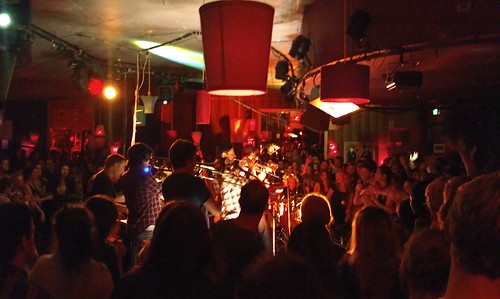
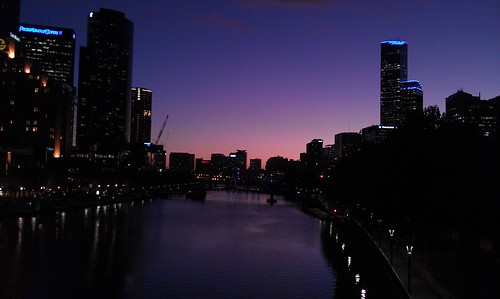
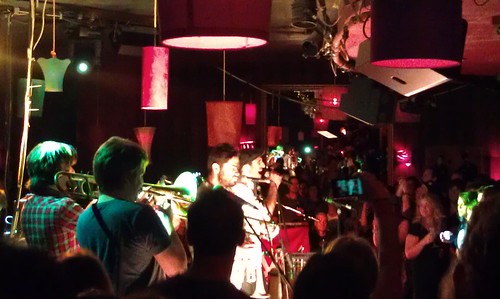
The camera does low light very well, and limits ISO Noise very very well. One issue with lowlight though is that it pushes more red into images than is necessary. Whilst the lighting at the nightclub where I took the photos of the Cat Empire, was heavily skewed red, this red dominance also came out in the sunset shot that I took at the river, there at least I had the Nikon D7K to get a much more realistic colour balance out of the shot. Which also is a case of apples and oranges, one is phone, one is prosumer DSLR ![]()
The flash on the camera is up to the task, but you will notice that the band shots don’t have the flash on, because I wanted photos of the band, not the back of people’s heads. You might want to remember that next time you’re at a concert. The great thing is that the Incredible also remembers the last state the flash was on as well, even when you exit the app. A nice touch, that means you can take photos quickly without having to reset the camera every time.
For reasons that are not knee bone is connected to the leg bone type of logic, if you are using the phone is being used as a WIFI hot spot ( which is great if you don’t have the USB cable with you, or you wish to share it with a few friends ), you can’t use the flash. I’m sure there is a good technical reason for this, but I can’t think what it was.
I’d much rather that the effects vs the settings could have been switched. Then I am a lot more of purist when it comes to photography anyway. The face detection works really well, even if the subject is in the background of the image, and the cameras inherent depth of field gets everything in focus. White Balance etc all seem to work just fine but nested as they are, tweaking one item, such as white balance, involved more clicks as sub items take over the menu structure.
The geotagging feature is great to leave on, but is one that I would have given higher priority to in the menus. I would love to be able to one click turn it off and on for photos as I went. Photos from home for example would not be tagged or from a friends place, but out in public tag away is the way I like to shoot. The GPS seems to get a fix very quickly, often one or two shots in a new location and they are tagged. A cursory look at images I have uploaded to flickr shows the location very accurately as well.
Sure, the camera has nice little effects, to be honest the only one I would consider using is the depth of field filter. Even then unless it was something I couldn’t get a feel for a particular shot that I was after. As a rule, and this applies to all photos that you take with your phone etc, don’t and I mean DON’T apply camera filters. Why, because in 12 months time, or even the day after you won’t have the unedited version. The photos off the Incredible should print really well, and unless you have the “clean” version you are going to regret not having it sooner rather than later.
But, words are words, images are images… I let them do the talking… ( ok, with just a touch of voice over…. )
(All images link to full size flickr version )
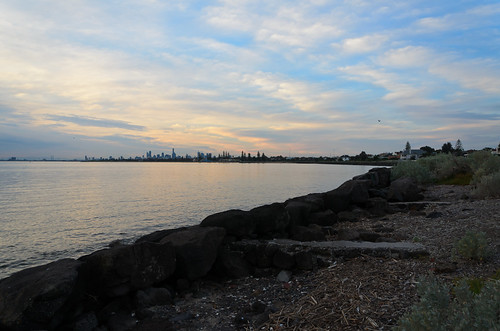
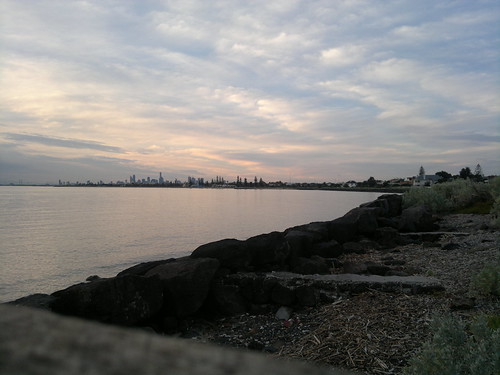
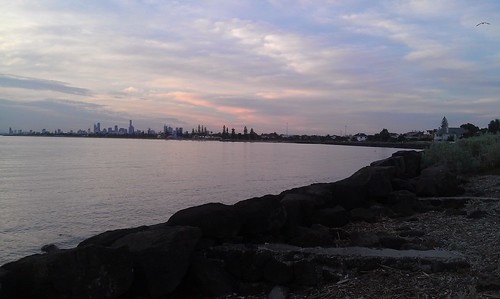
Dull Sunset Comparison
(Plus the Nikon D7000 that took the shot)
Nikon D7000
Nokia N8
HTC Incredible S
Nokia N95-8gb
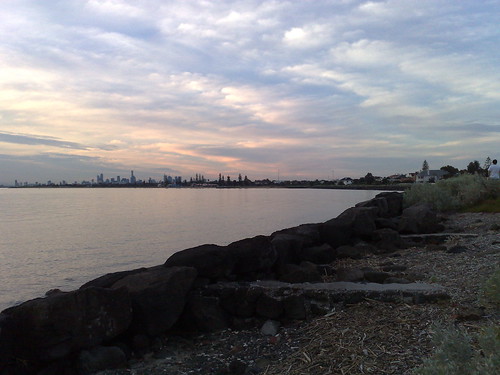
Nokia X-6
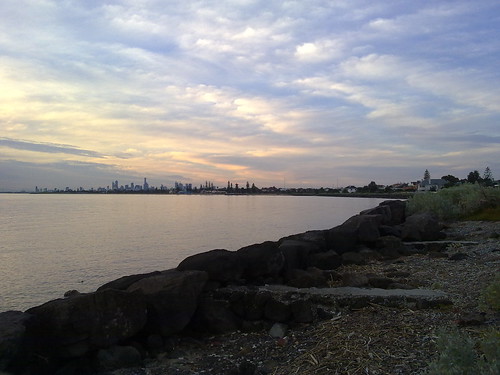
HTC Desire
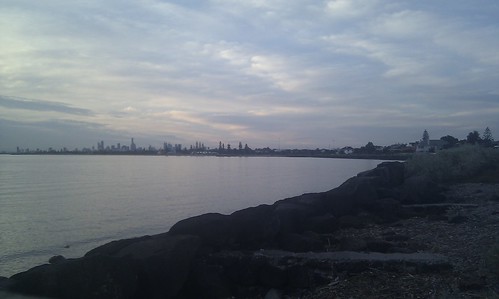
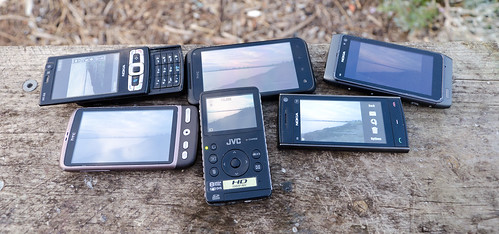
JVC GC – FM1
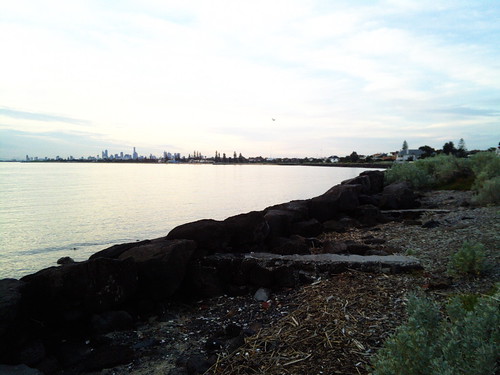
| Xres | Yres | ISO | Exposure | Focal Length | Aperture | Width | Height | JPG Size | Altitude | Lat | Long | |
| Model – NIKON D7000 | 300 | 300 | 280 | 1/125s | 18.00 mm | F 5.60 | 4855 | 3216 | 6.4MB | NO GPS | ||
| Model – N8-00 | 300 | 300 | 105 | 1/191.4s | 5.90 mm | F 2.80 | 4000 | 3000 | 1.4MB | NO FIX | ||
| Model – HTC Incredible S | 72 | 72 | 100 | No Data | 4.57 mm | No Data | 3184 | 1904 | 1MB | 0 m | S 37 53 35.05 | E 144 59 17.76 |
| Model – N95 8GB | 300 | 300 | 100 | 1/500s | 5.60 mm | F 2.80 | 2592 | 1944 | .77mb | NO FIX | ||
| Model – X6-00 | 300 | 300 | 100 | 1/250s | 5.20 mm | F 2.80 | 2592 | 1944 | .68mb | 30.50 m | S37 53 56.12 | E144 59 5.34 |
| Model – HTC Desire | 72 | 72 | 55 | No Data | 4.31 mm | No Data | 2592 | 1552 | .59mb | NO FIX | ||
| Model – GC-FM1 | 72 | 72 | 100 | 1/109.9s | 3.91 mm | F 2.82 | 3264 | 2448 | 2.1mb | NO GPS |
Notes:
The order is how I judge the devices.
Unsurprisingly the DSLR wins
, Next is the amazing Nokia N8, which is simply amazing as a camera on a phone. But given the hardware the Incredible S was against, it did do very well.
DPI, the higher the number the better the print. 72DPI is great for onscreen, 300DPI is better for printing, this is reflected broadly in filesize.
The D7000 shot was taken in RAW and exported via Lightroom 3. I do have the Solmeta GPS for the D7000, but it wasn’t plugged in J, the other phones that didn’t get a GPS fix had not been used in sometime and were not already on, when I did the test.
Both the Desire and the Incredible S are lacking much in the way of EXIF data, so a full comparison of EXIF Data is not possible. Either this is an ongoing firmware issue, or shows the limitations of the HTC Camera System.
Final point, remember that the Nokia N95-8gb is from 2007, so it is the oldest of all off the above devices by a number of years. Still the camera in that phone still stands up.
And here are some more shots from the Incredible S
Good light
Very dark room

The Macro as I said is fantastic. Add the touch the screen to move the focus point and you can get some great close up photos. The text in these images is nice and crisp.
This is a pretty sunset….
HTC Incredible Sunset
Nikon D7000 Sunset
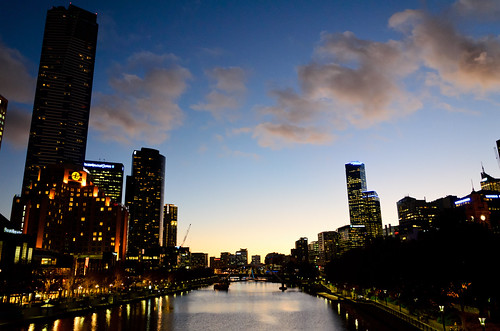
As you can see from above, the HTC made the sky a lot pinker than it was. Whilst most people wouldn’t care.. I do.
And now some night shots..
First from the HTC Desire
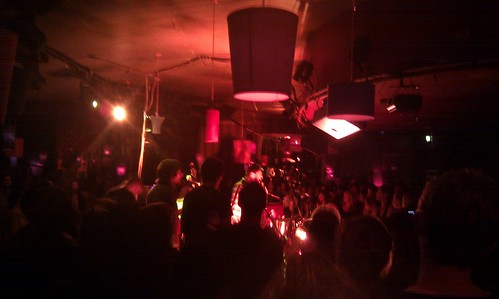
Now two from the Incredible S ( at both ends of the zoom).
And thanks for getting to the end of this rather long post…. The camera as I said is a great point and shoot, and is a good phone camera.
Thought I would set up a Flickr Set for my fav place to go and get photos. The North Road Foreshore Park, Brighton. Having got a few in the last few days, which when writing the description I thought I should expand upon.
About a 10min drive from home, this is the first place I think of when interesting weather is approaching, it looks like a good sunset, or I need along shot of the city. Parking is easy ( apart from NYE ) and I know the area so well now.
Yes there are a lot of sunset shots, but that is the time I aim to get there, with winter and the end of daylight savings though, sunsets will be alot harder to get due to work etc. But it is a great place for long exposures of the city at night, even the big fireworks shows.
I hope you enjoy this slideshow and take inspiration from the fact that one simple location can provide so much variety.
So I finally have a Nikon D7000 to play with. Sadly it is not mine however, and I shall cry myself to sleep for a while over that.
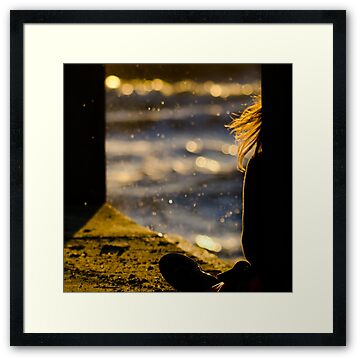
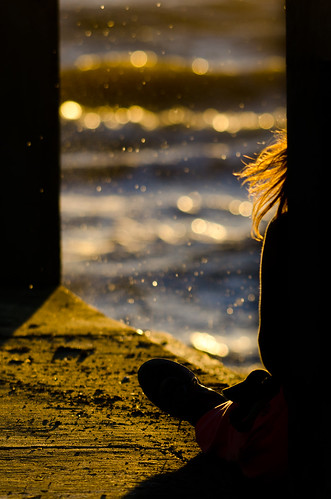
To put the camera through it paces I thought I would head to one of my usual spots, take just the Sigma 150-500mm lens and see what I could get. Whilst looking for shots, I walked back from the jetty a bit and found the perfect composure I was looking for. I am a big fan of taking photos of people, where you can’t tell who the person is. If you want to enter shots into competitions for example, they often want release forms for the subject. Not having the subject identifiable fixes this issue.
I took 18 shots to get this one,whilst it is either the first or last shot that ends up being the keeper, this was in the middle of the series. I was looking for a breaking wave and the girls hair to be flowing just the right amount. All the while I was kneeling on concrete to get the right angle for the shot as well.
Here is the Final Version of the Image as you can buy it on Redbubble
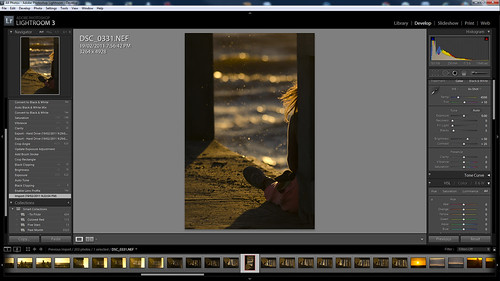
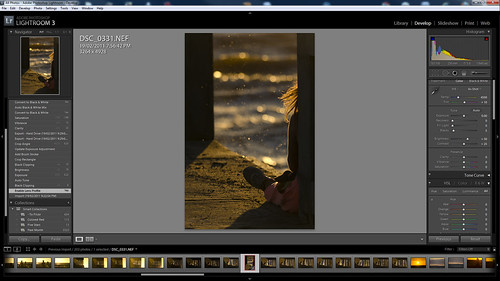
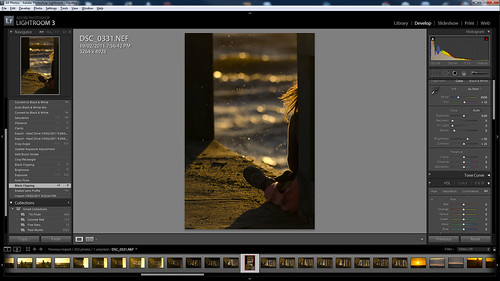
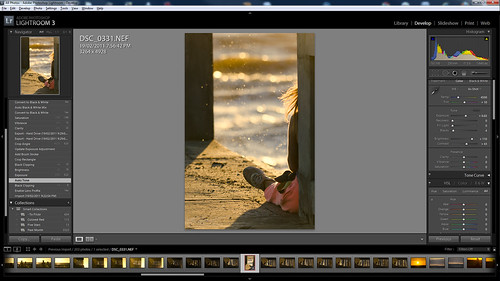
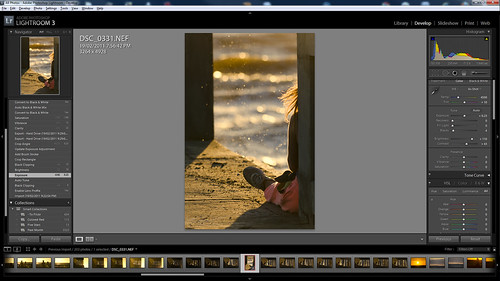
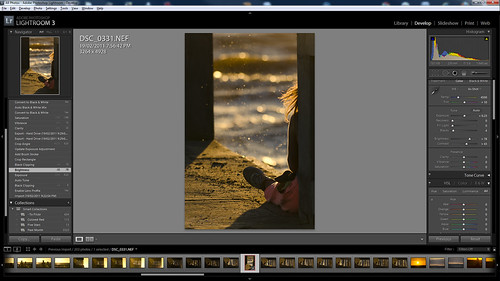
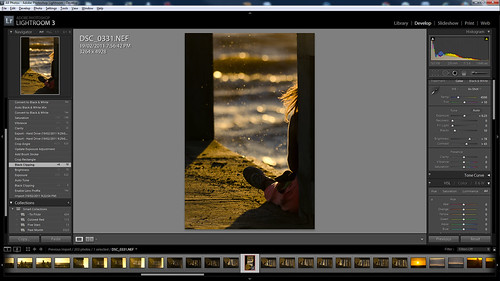
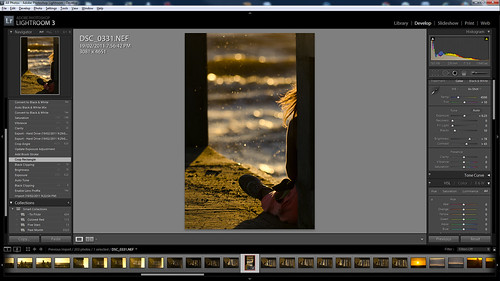
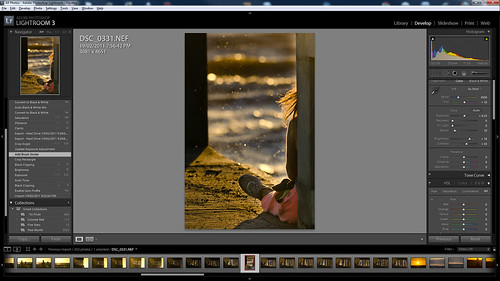
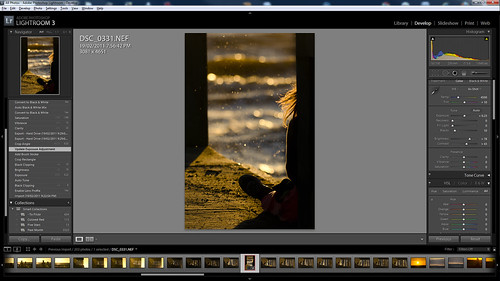
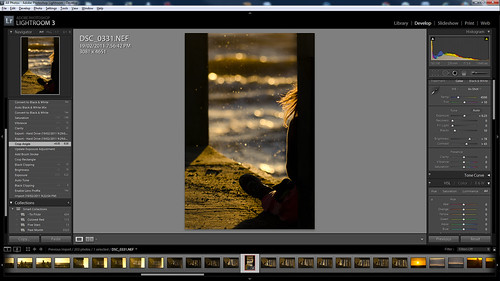
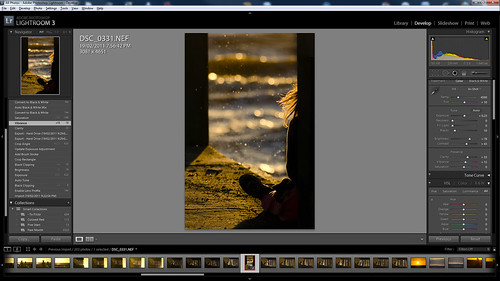
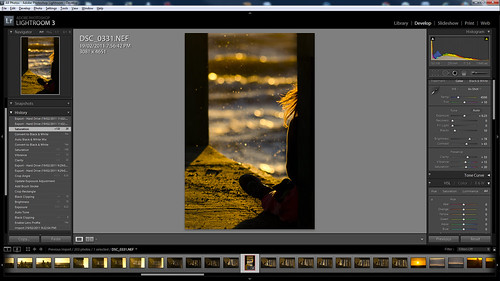
Each of these images opens into a new tab/window, in Flickr Lightbox mode so you can see all the details. These are untouched screenshots, so that you can see the whole process I went through. You will notice a few extra steps, where I tried a few things, which didn’t work, then carried on, such as a black and white version. But I haven’t commented on them.
The time frame for this processing was just under 5 min of actual sitting in front of the computer time.
Stage 1: This is the Raw Shot. So, I know I have the composition right, but the colour balance and weighting of the shot isn’t quite what I was after…
Stage 2: As my Sigma 150-500mm Lens is in the Lens, issues such as barrel distortion, vignetting and chromatic aberration can be fixed in one click.
Stage 3: I knew I wanted to pull the blacks up in this image, so I did a quick tweak of the black clipping just to see if it was worth progressing with the image processing. Often, once you start processing, with an end result in mind, you will come across images that you just decide not to finish with.
Stage 4: Ah Autotone… I like you as much as I hate you. It always overblows shots as far as I am concerned. I always end up pulling the shot back, but it can be a good quick fix to a number of issues.
Stage 5: And yep, the next thing after the autotone, is to pull the exposure back from the +0.65 that Lightroom’s Autotone did, back to +0.23. So some of the image is brought out, but not to much.
Stage 6: And like Stage 5, this was a tweak to pull the brightness down, so that the image is a lot more muted over all.
Stage 7: I needed to go back and pull the blacks up a bit more at this point, to push detail out of the shadows that had crept in so that your eyes follow the lines in the image.
Stage 8: Hand holding a 3kg lens of camera and lens in high winds whilst kneeling on concrete does of course mean your shot is never going to be perfectly straight. This was just a tweak to the rotation to line up the vertical elements.
Stage 9: This is a two stage process. Firstly using the Brush Stroke tool, I selected the girl, and the pole she was leaning against so that I could apply a filter directly to just those parts of the image. As Lightroom, remembers the last settings, it of course made them over exposed, but it is handy to see the shapes that I was covering.
Stage 10: Now I just reduce the exposure on the brush tool path, from 1 to -0.88, which drops the colour and the detail from the girl leaving a stronger shadow and removes the distraction of the details of her clothing, but keeps her hair and the rest of the image in balance.
Stage 11: Once you have finished doing the major changes to the balance of an image, what looked straight before may not look as straight again. So this was to fix the aesthetic straightness of the image.
Stage 12: In all the above tweaks the golden colour had become a little washed out. So this was just a tweak to the Clarity and Vibrance to pull the image up a bit.
Stage 13: And to finish off, just a small push to the saturation to ensure the image colour and feel was as rich as I wanted.
And the Exif Data for the Shot:
| Camera | Nikon D7000 |
|---|---|
| Exposure | 0.002 sec (1/640) |
| Aperture | f/5.6 |
| Focal Length | 250 mm |
| ISO Speed | 100 |
| Exposure Bias | 0 EV |
| Flash | Off, Did not fire |
| Date and Time (Modified) | 2011:02:19 23:02:36 |
| Exposure Program | Shutter speed priority AE |
| Date and Time (Digitized) | 2011:02:19 19:56:42 |
| Max Aperture Value | 5.7 |
| Subject Distance | 10 m |
| Metering Mode | Multi-segment |
| Custom Rendered | Normal |
| Exposure Mode | Auto |
| White Balance | Auto |
| Focal Length In35mm Format | 375 mm |
| Scene Capture Type | Standard |
| Gain Control | None |
| Contrast | Normal |
| Saturation | Normal |
| Sharpness | Normal |
| GPS Latitude | 37 deg 53′ 28.29″ S |
| GPS Longitude | 144 deg 59′ 6.89″ E |
| GPS Altitude Ref | Above Sea Level |
| GPS Altitude | 2 m |
| GPS Map Datum | WGS-84 |
| Creator Tool | Adobe Photoshop Lightroom 3.3 |
| Lens | 150.0-500.0 mm f/5.0-6.3 |
| Approximate Focus Distance | 10 |
Sorry for the lack of updates… between a new job and a new lens… hazahh… I’ve not spent much time behind the computer…. So here is a post based around a shot I always wanted and the new lens.
One of my favourite shots of the the setting sun, is the melting on the horizon version. The one with the full disk of the sun visible through the long light, and just at the point it is touching the horizon, with the extra distortions that the atmosphere gives the shot.
When I first got my Nikon D90 DSLR, it came with an 18-55 and a 55-200mm lens kit. All very nice, but 200mm still meant I had to crop a lot on the image to get the focal point out of the shots I was taking. Next was my 70-300mm. Much better… but still to much cropping on a 12megapixel image to pull the shot I wanted.
Finally I got my Sigma 150-500mm. For two weeks after I got it, I was running down to the beach at sunset. And every evening I either had something on at sunset, or as was the main case, a beautiful sunny day would turn cloudy at the last min, or the line of cloud 15degrees above the horizon would still be there.
Now I am lucky I live 10min drive from the water and that the sun sets over Port Phillip Bay in Melbourne for me. To be honest I am not a morning person, so having to get up at 5am for the shot wasn’t going to happen.
Finally, I get the cloud cover I want, and the major bit of luck the atmosphere I wanted. It is always hit and miss with sunsets as to what you will get, if the sun will slide cleanly into the water, or play nice optical tricks in that last few min before it sets. Here I got that balance.
This is a hand held shot, although a tripod for the sunset does make life much easier, even though you have to tweak the position of the camera on the tripod as it will move a few degrees as it sets.
This is a touch of patience and a touch of luck, combined with a 500mm lens. I hope you like it as much as I do.
The EXIF Data:
| Camera | Nikon D90 |
|---|---|
| Lens | Sigma 150-500mm F5-6.3 APO DG OS |
| Exposure | 1/3200 sec |
| Aperture | f/9.0 |
| Focal Length | 500 mm |
| ISO Speed | 160 |
| Exposure Program | Manual |
| Date and Time (Digitized) | 2011:01:29 20:34:01 |
| Digital Zoom Ratio | 1 |
| Focal Length In35mm Format | 750 mm |
| Scene Capture Type | Standard |
| GPS Altitude Ref | Above Sea Level |
| GPS Altitude | 5 m |
| GPS Date Stamp | 2011:01:29 |
| GPS Latitude | 37 deg 53′ 54.11″ S |
| GPS Longitude | 144 deg 59′ 4.98″ E |
It was also featured on the RedBubble Home Page… ( Click on the link to buy the image )
Flickr Gallery showing every lens combo I have from 11mm on my Tokina 11-16mm lens to my Sigma 150-500mm. ( updated with a 1000mm shot thanks to my 2x Kenko Teleconverter
Shows you the range that you can get with just a few key lenses in your kit. – The Distance to Eureka Tower ( the tall building I zoom in on ) is approx 8.5km as the crow flies.
Best viewed full screen.
( and for those who are on non flash enabled I thingys… go to the Flickr Set here )
All Shots were taken on Manual Settings:
| Camera | Nikon D90 |
|---|---|
| Exposure | 0.001 sec (1/800) |
| Aperture | f/9.0 |
| ISO Speed | 200 |
Lens used in order were
Tokina 11-16mm, Nikon 18-55mm VR, Nikon F1.8 50mm, Nikon 55-200mm VR, Nikon 70-300mm, Sigma 150-500mm, with each lens taking a shot at both ends of its range.
Shots are not taken for aesthetic value, and neither did I have a proper tripod set up to ensure that the shots were perfectly lined up for focus point. ( A decent tripod is next on the list of things I need to buy )
—
Update
the 1000mm shot is taken in Automode on a D7000 a year later than the above shots from the same location care of a 2x Teleconverter. The haze in the shot shows the limitations of long shots as well.
This post shows how I created this image via all the processing in Adobe Lightroom 3.4 ( The previous blog entry Missing from the EXIF: Midnight Fireworks covers the details of the actual shoot itself )
Most of the processing was done when I got home from the fireworks show, with only additional cropping the next day before it became the Redbubble version of the image.
Each of these images opens into a new tab/window, in Flickr Lightroom mode so you can see all the details. These are untouched screenshots, so that you can see the whole process I went through.
This covers from 12:54:56am when I opened imported the image to Lightroom, to 1:01:58 when I exported the image for uploading to Flickr.
Stage 1: The Raw Image. Shoot RAW, if you shoot JPG once you start pushing an image you will run into its limitations. RAW as the digital negative is way more forgiving. Further as Lightroom is non-destructive on your RAW files, you can tweak till your heart is content, and still go back to the original if ( in my case when ) you go to far.
Stage 2: Rotate and White balance. – As all the images from the start of the show to the finish were in the same light, and the camera was fixed to a tripod, I tweaked one image quickly for rotation and balance. Then in Lightroom, copied only those develop settings, then pasted them to all the images. ( Batch processing even small parts of a job like this is a great way to speed up developing. )
Stage 3: Autotone. – I never like how many tools AutoTone images. To my eye, they always over expose the image and it always end up washed out. But it is a great place to start. If you treat Autotone as a starting point, then you are o.k… it never should be an end point. Also I find, at least with my Nikon NEF (RAW), that the image always looks insipid, especially bright colours. So expect to have more work after using this feature.
Stage 4: Brightness. – First thing to fix after the AutoTone, is brightness. This was an image taken at midnight, I want the fireworks to standout, not the sky, or the water. In this case, even a small reduction in brightness, brings the fireworks out of the sky.
Stage 5: Fill Light. AutoTone also introduces a fill light. Great for bringing objects out of a shadow. But once again, that is not what I was after. Drop the fill light right back for this style of image.
Stage 6: Black Clipping. Pushing the black levels up, pulls the bright colours of the fireworks out of the background. Also a small increase in black levels can hide a multitude of sins. Be careful not to push it to far, as it can go from forgiving to punishing an image very quickly.
Stage 7: Exposure. Here I pushed the Exposure of the image up just a fraction. Suddenly the colours that were a bit dulled with the Black Clipping and Fill Light, push back up, giving the image its vibrancy once more. ( Also don’t be afraid to play with the Vibrance and Saturation modes in the Presence panel, these can help lift an image. )
Stage 8: Crop – Possible the most important stage in this images development. One that can take a broad image redress the balance issues and transform it to a striking image. In the first instance it was to balance the image to the rotation that had been put on the image in import. Then I major crop to pull out a lot of the empty space that was the sky. Lightroom in crop modes gives you a nice rule of thirds crop tool. So I balanced the image around a series of thirds for the fireworks and the sky above the skyscrapers.
Stage 9: Angle Correction – Don’t you hate, when you fix and angle and it still isn’t right. Once the image was initially cropped, I could see the leading lines clearer and the horizon looked a fraction out.
Stage 10: Lens Flare Removal – 3 annoying green dots appeared on the image. Small lens flares from the bright light of the fireworks. Lucky for me, these could be quickly and easily removed as they were in a black area of sky, and not hanging over an important part of the image. If they had been, it would have been a lot of work to clean these up. And Photoshop would have been the tool I would have had to switch to. The Spot Removal Tool can quickly pull pixels from a reference area and this only takes a few seconds to get rid of what really are just blemishes on the image.
Stage 11: Aircraft Removal – Once again using the Spot Removal tool, I removed the 3 little traces of light that were in the image that were the aircraft that were filming (I presume), the show. At such a short exposure, the lines they made only served to act as distracting elements in the final shot.
Stage 12: Final Crop for Redbubble – Looking at this image the next day, I really wasn’t happy with the balance of the image. It had to much space on the left hand side, and it was still way to top heavy. Before uploading the image for sale, I tweaked the crop to balance the image better, and give it its final aspect ratio as well.
Anyway I hope you can see from above, that 5 min in Lightroom can take a good image and help to transform it up at least a few levels. Apart from managing my complete image libary, 90% of my images never leave Lightroom, I can do all the “digital developing” I need just in the one tool.
Remember if you buy a copy of this image… the money will help me buy more camera equipment… ( Next on the list the Sigma 50-500mm OS, which would have given me even betterer shots
)
In no particular order….. with a few details on why I choose each of them.
Of course, I will walk away from this blog post, and go… oh shit, what about x or y… but these are the stand outs for differing reasons.
But one thing these shots have in common is getting out there. Sitting behind the computer may get you a few shots, but going out in the rain, the heat, the crowds, the isolation will get you the good photos.
10,000 Meters
Taken from an aircraft window, the colour for me tells the story. This is one of my no subject matter shots, that says photography is still art.
Buy this at Redbubble
Freeeeedom
Taken at Brighton Beach, this shot for me is about fun, summer and expression. And a lot of luck to get all the elements and the camera in play at the same time.
Buy this at Redbubble
The end of 10
Oh so many sunsets to choose from…. This one has it all, the light, the colour, shapes and silhouettes.
Buy this at Redbubble
Voting in Australia
I was really pleased with this shot, one a quite a few, trying to capture what Voting in Australia really means.
Peace Love Brains
For the life of me, I have no idea how I got the lighting on this shot so right. Taken at the Melbourne Zombie shuffle.
We Shall Remember them
This is the first dawn service I have got up for in quite sometime. One of the hard things, was trying to find a place to get a photo from, due to the crowds.
Buy this at Redbubble
Some people are just born Republicans
Taken the day after I got my new 300mm lens, this is a still photo as a story.
The Way Home
Still one of my all time fav shots. This shot is a what the camera see’s, not what I saw. And is the shot I was aiming for. I could see all the details in the dim light, I set the shot up to remove them and it worked.
Buy this at Redbubble
Closing up for the Day
The depth of field and colouring in this shot all just sat together perfectly for me.
Buy this at Redbubble
@JohnBirmingham signing his new book After America
I was trying to get a photo of John, but one that told a story, not just a “fan” photo. This I felt was the essence of why he was where he was at the time.
Magic hour, the hour around sunrise and sunset is called that for a reason. The best light can be found when you have a touch of luck and a lot of patience. This shot was taken from what was a fairly average sunset. But instead of putting the camera away and heading home, I stayed out for another 30 minutes, to grab the last touch of light.
In taking this shot, I wanted the whole sky, even with my 11-16mm Tokina, I still didn’t feel I had the whole sky. Thus I went for the panorama. When lining up the shot, the one thing I did notice, standing on the foreshore was the small waves lapping on the shore. When trying to line up a panorama, waves are just a path to heart ache. So I walked out till I was thigh deep in the water, passed the lapping waves.
This is a handheld panorama of about 10 shots, with a lot of overlap. When shooting panorama’s always shoot in manual mode. That way, when the shots merge, you will have consistent levels across each shot. Checking one shot that balances the light and dark will mean that your levels will be averaged out. The final image is 6335 x 4133 ( compared to 4288×2848 from the D90 )
Also this was one of my first sunset walks with the new GPS, but for some reason, my GPS decided I was 10 meters above sea level.
| Camera | Nikon D90 |
|---|---|
| Exposure | 0.004 sec (1/250) |
| Aperture | f/6.3 |
| Focal Length | 16 mm |
| ISO Speed | 250 |
| Exposure Bias | 0 EV |
| Flash | No Flash |
| Date and Time (Modified) | 2010:12:04 21:56:54 |
| Exposure Program | Manual |
| Date and Time (Original) | 2010:12:04 20:44:05.00+11:00 |
| Date and Time (Digitized) | 2010:12:04 20:44:05 |
| Max Aperture Value | 2.8 |
| Custom Rendered | Normal |
| Exposure Mode | Manual |
| White Balance | Auto |
| Focal Length In35mm Format | 24 mm |
| Image Number | 87921 |
| Lens | 11.0-16.0 mm f/2.8 |
| GPS Version ID | 2.2.0.0 |
| GPS Latitude | 37 deg 54′ 57.54″ S |
| GPS Longitude | 144 deg 59′ 8.35″ E |
| GPS Altitude Ref | Above Sea Level |
| GPS Altitude | 10 m |
| GPS Date Time | 2010:12:04 09:44:02Z |
| GPS Satellites | 10 |
| GPS Img Direction Ref | Magnetic North |
| GPS Img Direction | 8.3 |
( Linked image is to lightboxed version as well, which looks much nicer )
And you can buy this as a print from RedBubble as well
I’d love to work in main stream media, there are so many perks. The biggest these days seems to be that you can appropriate content from anyone with a glib line and not give them any recognition what-so-ever.
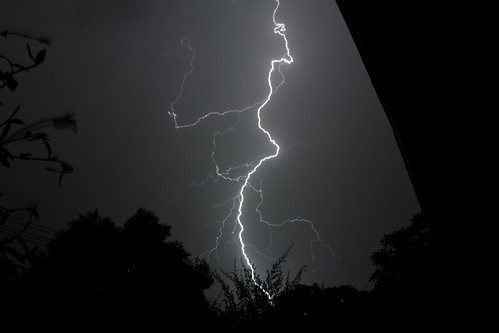
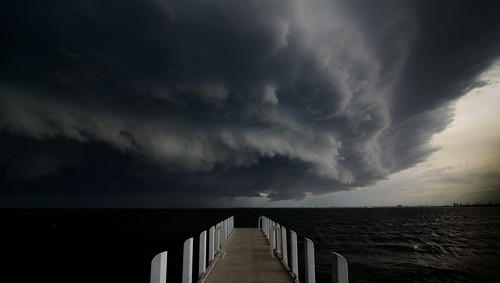
Melbourne had a very impressive line of thunderstorms move through on Friday (12 Nov. 2010) evening, so as a weather “nut”, I’ve got the radar on the computer, and the camera ready to go. When a squall hit at home, I switched from stills to a quick 1 minute video.
Perchance on Saturday night, (TV in the kitchen while cooking tea) I happen to catch the Melbourne 9 news story about the weather. And whilst still being grumpy about calling something a mini tornado, which there is no such thing as, I see a glimpse of a bit of footage, and think, hey that looks familiar…
Today, I checked the NineMSN website for the story, with that nagging feeling still present… and guess what… it WAS my footage. 2 seconds or 10 seconds doesn’t matter to me. It was my footage, I did not give permission, was not asked for consent, was given no recognition, and certainly I was not TOLD.
http://news.ninemsn.com.au/video.aspx?videoid=1cdb6005-75d8-4622-9ba0-c81aae430307 ( scroll to 1:22 ) ( Can someone identify the second piece of footage? )
If I had been asked, the chances are I would have said yes, but that really is beside the point. If someone from Channel 9 is surfing YouTube for content, how hard would it be to leave a comment saying, “great footage, can we use it”, or even, “great footage, we used a few seconds of it on the news”. It is about recognition, not theft!
Guessing what 3 seconds of footage on primetime news costs, I think if channel 9 buy me a new Nikon D7000, I’ll take that as payment for services rendered.
Really, come on media, lift your game.
My footage ( watch on youtube for the 720 version, video recorded on my Nikon D90)
and one of my still shots…
Update:
——–
Fair dealing for purpose of reporting news
(1) A fair dealing with a literary, dramatic, musical or artistic work, or with an adaptation of a literary, dramatic or musical work, does not constitute an infringement of the copyright in the work if:
(a) it is for the purpose of, or is associated with, the reporting of news in a newspaper, magazine or similar periodical and a sufficient acknowledgement of the work is made; or
(b) it is for the purpose of, or is associated with, the reporting of news by means of a communication or in a cinematograph film.
——–
I’m guessing option b is what their defence would be, but still, my point of being TOLD, is not covered. Someone from Channel 9 was on Youtube, took MY copyrighted content, for “news” value and couldn’t even be arsed to leave a comment saying that they had?
I guess it falls into the you wouldn’t steal a car, you wouldn’t steal a handbag, don’t steal a movie, unless it has news value, and you don’t want to even notify the owner of the video you have “stolen” it.
Unless as per Section 6 par C of the Youtube TOS http://www.youtube.com/t/terms Channel 9 have a licensing deal with Youtube for content. Personally I’d like to know if Channel 9 do have a deal with YouTube, and certainly if they haven’t does the Copyright Act trump the TOS of Youtube and Google? ( I’ll leave the lawyers for the respective parties to argue that one )
Perhaps it is time the Copyright Act was dramatically updated to include fair use of social media. A clause of attribution and notification on the source of the content seems reasonable to me.