Entries Tagged as 'n95'

#telstradesire vs Nokia N95-8gb

When I entered the Telstra Social Reviewers I said I was interested in geodata and that what I wanted out of it was to know if it was time to upgrade my 3 year old Nokia N95-8gb.

For the really lazy… Here is my conclusion..

I like the HTC, I like Android and I’m finding myself living more and more connected due to this phone. If you use Google a lot, this is the phone for you, if you use Google a bit, this is the phone that will make you use Google alot.  There is a lot to like about it, there is a lot to be frustrated by it.  But will I recommend it to people.  Yes, with a big caveat you have to be someone with time to invest to get used to it.  Also this phone is for someone with a dataplan.  If you don’t have a decent data plan you are not going to get the most of out it.

On with the review…. my 3 year old nokia…Most people would say.. but the phone is three years old.. why haven’t you upgraded.  The reason was evolution not revolution.  The original N95 to me was the Revolutionary phone.. the N95-8gb which I got was the evolution.  One of the reasons for getting was that it had Flash Lite 2.1… aka Flash Lite with Flash 7 video.  (Sorry Steve but flash has been on mobiles for a few years now!), coupled with the GPS, wifi and 5 Mega pixel camera this phone still served me well.

What is interesting is that on paper the HTC-Desire is so close in so many areas.  At least for the things that I was particularly interested in. Of course I am moving from the old Nokia to the new HTC as my new base phone, but what I think I should point out is just where the phones are different.

Comparison Table N95 – HTC (Table Modified from – GSM Arena)

Display
TFT, 16M colors AMOLED capacitive touchscreen, 16M colors
240 x 320 pixels, 2.8 inches 480 x 800 pixels, 3.7 inches
- Accelerometer sensor for auto-rotate - Multi-touch input method
- Accelerometer sensor for UI auto-rotate
- Proximity sensor for auto turn-off
- Optical trackpad
- HTC Sense UI
Speakers Stereo Mono
Memory
Internal 8 GB storage, 128 MB RAM 576 MB RAM; 512 MB ROM
Card slot No microSD, up to 32GB, 2GB included
Data
WLAN Wi-Fi 802.11 b/g, UPnP technology Wi-Fi 802.11 b/g
Bluetooth Yes, v2.0 with A2DP Yes v2.1 with A2DP
USB Yes, v2.0 miniUSB Yes, microUSB v2.0 (Includes Charging Via USB)
Camera
Primary 5 MP, 2592 x 1944 pixels, Carl Zeiss optics, autofocus, LED flash 5 MP, 2592 x 1944 pixels, autofocus, LED flash
Video Yes, VGA@30fps Yes, WVGA (800×480 pixels) @ 15fps
Secondary QVGA videocall camera No
OS Symbian OS 9.2, S60 rel. 3.1 Android OS, v2.1 (Eclair)
CPU Dual ARM 11 332 MHz processor; 3D Graphics HW Accelerator Qualcomm Snapdragon QSD8250 1 GHz processor
SMS, MMS, Email, Instant Messaging SMS(threaded view), MMS, Email, Push Email, IM
WAP 2.0/xHTML, HTML HTML
Stereo FM radio; Visual radio Stereo FM radio with RDS
Maps Ovi Offline Maps (Now $10) Offline Maps with 3rd Party $50)
GPS Yes, with A-GPS support; Nokia Maps Yes, with A-GPS support
- Dual slide design - Digital compass
- WMV/RV/MP4/3GP video player - Dedicated search key
MP3/WMA/WAV/RA/AAC/M4A music player - Google Search, Maps, Gmail
- TV-out - YouTube, Google Talk, Picasa integration
- Organizer MP4/H.263/H.264/WMV9 player
- Document viewer (Word, Excel, PowerPoint, PDF) MP3/AAC+/WAV/WMA9 player
- Voice dial/memo - Facebook, Flickr, Twitter applications
- Push to talk - Voice memo
Battery
Standard battery, Li-Ion 1200mAH (BL-6F) Standard battery, Li-Ion 1400 mAh
Stand-by Up to 280 h Up to 340 h (2G) / Up to 360 h (3G)
Talk time Up to 6 h Up to 6 h 40 min (2G) / Up to 6 h 30 min (3G)

For me what is interesting is that the Nokia still holds its own in a large number of these fields, including camera, wifi, gps and multitasking.

I’ve given the nod to Nokia for battery as well whilst on paper the HTC is the better battery, not once you start using the features of the phone and features is what is comes down to. Until people start putting “using the phone time” in battery life is somewhat of a useless number.  9 years ago this kind of computer was top end sitting on your desktop.  Now it is in your hand.

The camera also goes to Nokia as well for the optics, but the camera controls are more refined on the HTC, but the dedicated Camera button on the Nokia is much easier to use, also the way you hold the phone is much easier with the Nokia and on the HTC I kept covering the lens with my hand.

The screen goes hands down to the HTC, it is a joy to use and is so bright and clear that even going back to the Nokia for 20 minutes was to be honest quite hard just to read the text on the screen.

I’ve already blogged about the GPS, which is incredibly fast and responsive and with the digital compass a huge advance of the Nokia. Couple that with the beautiful screen it is a great car gps as well.  However Nokia still have one big thing over all the Android phones and that is Ovi Maps.  The fact that you can now get (on all new Nokia’s) free world wide offline maps this is something that I missed with the HTC.  I often use my Nokia to plan routes or when I am travelling outside phone coverage and even in the dense urban areas your map never goes offline and you never have to pay for data charges to get maps.

The Android Store can be a dogs breakfast when using if from your phone.  Sure if you know just what you are after then it is great, but it still needs a lot of work to be really user friendly and help users find the apps and give them the control on sorting.  However there are number of third party solutions, AppBrain in particular is very handy giving you control over your apps and the ability to see what your friends have installed.

I miss my Real Player and my Divx player as well.  Like a number of things, that is not HTC’s fault, nor Androids, someone hasn’t built them yet.  Sure people scoff at Real Player, but there are a lot of sites that still use it and a lot of streaming radio uses it as well. I am going to miss the TV out function as well, I liked being able to see my camera photos on the tv when I was travelling.

The wifi in the Desire is very impressive… getting signals at the other end of my house where the Nokia doesn’t.  Which means that I can be a little bit further out from free wifi and still get a signal, which suits me perfectly.

As for the Telstra set up, I get where they were coming from in the way they put the apps on.  Sure they want to push their own brand, but do it right.  WAP is not an Application.. so don’t make things look like Apps that are just WAP Links.. Further why WAP… seriously this phone can display stunning webpages.. make light version of the page yes, but not WAP.  And let people remove them.  Why introduce limitations to a device that was designed not to have them.

As for Network, if you live outside the major metro’s I would say Telstra hands down.  If you travel outside the metro’s frequently also Telstra hands down.  Nationally their network is fantastic.  Yes when they say their coverage is in more place and is stronger they are telling the truth. If you live in the city though other factors can come into play… price is the biggest one.

Using the HTC is fast, it is very responsive and with the update to Android hopefully due soon it should be even faster.  Couple that with Flash 10.1 and this phone is seriously going to rock.  I look forward to seeing what Nokia can come up with, but it looks like Android have me in their grasp for a while yet.

When I work out more things… I’ll just add more blog posts.. but without the hashtag :-)

A suprise near conclusion for the #telstradesire

When I started this, I was thinking would I use this phone to replace my Nokia n95-8gb and whilst the answer is a qualified yes… there is a different item it may well end up replacing.

The Car Computer for the Road Trip My UMPC, the Asus R2H which I use primarily as my car computer these days (yes I am that sad I have a car computer).  I’ll need to trick it up a bit.. like with a bigger SD card or two but it could be possible.  The main things I do with the R2H are make time-lapse driving videos (eg http://www.youtube.com/watch?v=CwjbluNF3So)  and run OziExplorer for offline detailed topomaps to see where I am and where I want to go.  Google maps just doesn’t cut it when you get off the beaten path. And have some music to sing along badly to.

With a few well choosen Apps I could do this.  It is going to take sometime to work it all out, but I really think that this is possible.

There are a few things that the R2H can do that the Desire can not.. storage and downloading photos from my D90, but I can still take the computer for longer trips, just not mount it on the windscreen.  One of these weekends I’ll get a decent screen mount, and I already have a lighter to USB power supply, plug in my FM transmitter to the headphone jack and I think it can be done.

I really wish that I could get offline navigation for free like I can on my Nokia with Ovi Maps (well not free $10 because I have an old phone) but still… the fact I am even considering this I think is noteworthy about the device.

http://www.wolfcat.com.au/randomrants/tag/r2h

Video Comparrison for #telstradesire

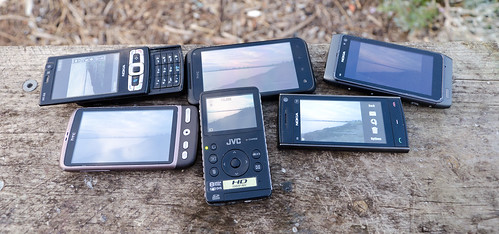
Kind of sad when you think… I’ll just go up the road on my holiday to make a video to test out my HTC Desire for its video making abilities to realise that you had on you 4 different devices capable of making HD (or near HD) video…   I was annoyed I forgot to take my wife’s phone so then I could have made 5 videos :-) …. ah well… 4 will just have to do.

All of these sample Videos are on default settings for recording only, where I walked part way up the Elizabeth St Mall in Hobart repeating the same walk 4 times (yes I did get some looks :-) )

Devices used were a Nikon D90, a HTC-Desire, a Nokia n95-8gb and a  JVC GC-FM1 PICSIO

Output formats and files Sizes

Device Native Format File Size Frame Size FPS Audio
Nikon D90 avi 112mb 1280×720 24FPS 176kbps-mono-11kHz
HTC-Desire 3pg 7.46mb 640×480 26FPS 12kbps
Nokia n95-8gb mp4 15mb 640×480 27FPS 96kbps-mono-48kHz
JVC GC-FM1 PICSIO mov 57.8mb 1440×1080 29FPS 130kbps-Stereo-48kHz

D90 Video


HTC Desire Video


JVC GC-FM1 PICSIO Video


Nokia N95-8gb Video


Now one thing I did try was to upload these videos via the YouTube app on my phone as a way of testing upload speeds… guess what… you are not allowed.  The YouTube App says no you have to upload large files via wifi only.  I really can’t begin to describe how wrong that is.  What if you don’t have wifi, what if you are on the road in the middle of no-where taking photos and have 3g coverage (like this shot).  I’ve had Telstra 3g coverage in some amazing areas.. but certainly no wifi… so how do I upload video?

What happens when someone sees something amazing or even breaking news and wants to upload it… well they can’t.  If this is going to be a true social device that has to change and change fast.

where I am coming from for the #telstradesire

There have already been comments that all(most) of the people doing the Telstra HTC Desire review are  basically just taking a bait.  Given the people that are on the list I’d have to say  that is very disingenuous to those folks.

That aside, I thought I would take the time to write down where I am coming from.

I’m not primarily a Telstra customer… I have a backup Telstra Phone that I only use on my extra long road trips, say twice a year (if I am lucky).  This phone just sits in a draw the rest of the time without credit as there is no way to keep long term credit on prepaid without it expiring.  Funny thing is that stamps don’t expire, but phone credit does.

But then I spend most of my time in a large city with access to basically blanket coverage anyway, so coverage as never been a major issue for me. I am a free wifi hunter, data rates in this country are to put it kindly criminal.  Sure sending a few tweets here and there is nothing, but when the SMH home page weights about 1 meg and refreshes… that starts to add up very quickly.  More when you consider that if I was to use data it would be for storm chasing and uploading high-res photos from my D90 the cost is way out of my budget.

And I am not an iPhone user, and to be honest the iPhone has never attracted me.  Sure it is a very nice looking device, but my trusty 3 year old Nokia N95-8gb still out performs the iPhone for the task I use it for.  Those tasks are making calls, using the camera and GPS tracking primarily.  Nor have I been a big application installer. I kind of tend to find a series of apps that do what I am after and stick to them.  The background recording of GPS traces has meant that I could never use an iPhone as that is what I consider a base requirement for a device is the ability to mulitask.  Neither is the camera and use I use the front camera for video calling occasionally as well.

I did play with a Nexus One for about 5 min over a beer and must say that is was the first phone that made me stop and think about jumping ship as it were.  The N97 whilst an improvement over my N95, just wasn’t the huge leap I was looking for.  The N900 still isn’t on plans in Australia and with the changes to Symbian has a real risk of being technology that is going to be OS Redundant by the time it hits our shores.

So I have been plugging away with my phone which I can use very easily with one hand with it’s 8gig of on-board storage, tv out, replaceable battery, multitasking, damn fine camera e.t.c quite happily. The other main thing I do with my phone is interact on twitter in the evening, with the phone connected to my home wifi using dabr.co.uk as my primary web app.

It is going to be interesting to see if I can not only move to a wholly new platform but a new way of interacting with a device and yet still keep the things that I count as my minimum requirements.

To really it put the phone through its paces I’ll use just the HTC Desire whilst I am in Hobart for four days and see what I can do about video, photography, GPS, calls and social networking, then I will see how it goes through day to day real world use as well.

It should be interesting, I’m willing to look at something new it just has to fit my “old” requirements as well.

P.S

I’ve set up a Twitter list for all the other people on the Social Review here as well which you can follow.

http://twitter.com/wolfcat/htc-desire-telstradesire

Geotagging without a dedicated GPS on your DSLR

Now of course this works for any camera digital camera not just high end DSLR’s.

I guess people are going to say but who cares about Geotagging photos.  That is easy… say you are on a once in a lifetime trip heading to some out of the way places or even just around town.  You take that great photo of a beach, a wall or even a person… now in 6 months time are you going to be able to find that location again are you even going to remember where it was roughly…    This is why I geotag my photos.  I can now find any location for my photos from the last 3 years, because all the photos have it stored in the Exif data.

I am going to show how using the GPS built into my phone running in the background I can do this.  So you people with phones that have a GPS that can not multi-task will have to spend some money and get a logger to be very accurate. My Nokia N95-8gb runs Sports Tracker in the background just fine so this is what I am going to use as my example. Then by using software called Geotag will add lat long and altitude to all the images, before they are uploaded to flickr.

The biggest advantage of Geotag however is that it will add the data to the RAW files as well as the JPEG/JPG files.  Formats include ARW (Sony), CR2 (Canon), DCR (Kodak), DNG (Adobe), ERF (Epson), MEF (Mamiya), MRW (Minolata), NEF (Nikon), ORF (Olympus), PEF (Pentax), RAF (Fuji), RAW (Panasonic), SR2 (Sony) and SRF (Sony).

Geotag should run on any operating system for which a Java SE 6 runtime is available.

Of course you can just manually add lat and long to say Flickr or Picasa but if you have a big set of photos or have travelled a long distance in a few days it is always easier to get software to do it all for you without having to guess locations.

First Step.. and most important... Make sure that the time on your Phone and on your camera are as close as possible. The software works by comparing the time stamp of the photo to the time on the track file.  You can set offsets for it.. but it is just easier to get it right in the first place.

Always switch on the logging software on your phone and wait for it to get a fix.  If you just fire up the software and hit the road and start driving it can take a much longer time for the GPS to get a fix than if you are stationary. Once you are happy that the software is working you are good to go.  Another tip is to break up a journey into a series of smaller track files, that way if the software crashes you still have a large part of the trip as a log file.  For example when I have been on my road trips I’ll often stop the GPS and start a new track when ever I got out of the car to take photos.

So lets dive in…

Getting the Log File to Geotag.

Open Sports Tracker, go to Training workouts…

Select the date you are after.

Now find the first track file you want.


Then Choose, Export, then Export as GPX. Most GPS Log file software programs handle GPX and this format contains all the info you are after.
Then Choose create file only.
It doesn’t matter what drive you put this on.. so often Root Drive is just faster especially if you have a few track files to create.

.. Repeat as needed :-) …..

Then once you have all these files simply drag and drop from your phone on to your computer so then we can move to the next part of the process.

Once you have opened Geotag choose File > Load Tracks From File.

This will let you select all the small tracks files that you have created in one group so you don’t have to open each track file on its own.

Then you can either open up just the image files or a whole directory.  I tend to just import into Lightroom, do a quick pass to delete the dud shots, then tell GeoTag to look in the directory from the last import and work from that.

Now with the Track Files and the Directory Open, you right click, choose Find Locations > For All Images.

At this point a cup of coffee may be required if you have a few thousand images…

Once it has finished processing you will have all your images that the gps was working for tagged…

Then just choose Save All and you are done.  Now your RAW files and your Jpegs have the correct geodata embedded into them, so any time you upload to a service that supports Geocodes your photo will be mapped automatically.

You can of course get GeoTag to look up information such as lat, long, altitude, place names or get it to guess locations based on missing parts of the track file.

Another trick is to take one photo with your phone that is geotagged and then copy that information to the rest of the photos.  This is great trick if you are in just one place.  As another trick before going indoors take a photo of the front of the building, then use that as your tag if you cant get a GPS signal indoors.

Of course the easiest thing to do is to buy a GPS for your Camera, but if you don’t mind spending a bit of time the above steps should save you a bit of time money and still give you what you need.

(PS, I still have  dedicated GPS for the camera on my to buy list.. but I am a bit fussy like that :-) )

Storm Over the Field

Taken at: 26°38’11″S, 149°54’29″E