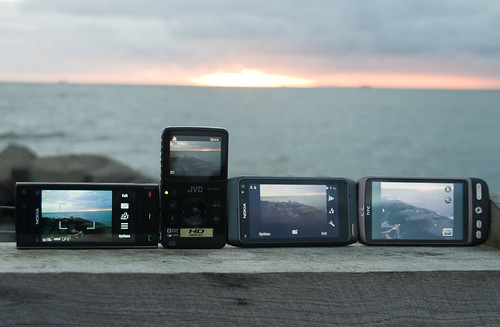
Ok, so I have been using the Nokia N8 for two weeks now. Have played with it lots and really enjoying it in so many ways. Yet here I am writing a blog post review it, and the title says I didn’t want to. To be honest I really wanted this phone. When first announced, I was still using my Nokia N95-8gb, waiting for a phone to beat it. I thought the N8 was going to be that phone.
Of course in the interim I was seduced by the dark side as it were… – no not Apple, (not that dark), but Android; the HTC Desire.
To be a spoiler of my own review, if I was comparing only the Nokia family, then the N8 is an amazing “phone”. These days, for a great number of people including myself that just isn’t enough any more. Many people need a mobile computer; access on the go to Google, email, games and importantly social networks.
Nokia, you aren’t playing in the same game anymore. The N8 is without a doubt an amazing Nokia phone. But Nokia the game has changed, you needed a product that will bring people back to you, and unfortunately this is not it.
And on to the why’s and wherefores about my decision. Certainly, there are a lot of features that are more than worthy on the N8, many of these features will get dedicated blog posts of their own over the next few weeks.
The Nokia N8, is great to hold. It feels solid in your hand, without being plastic and cheap. It is also one of the few phones on the market that stands up on its own. Whilst, on paper it is close to the HTC Desire, I like the feel of the N8. You know you are holding a solid piece of engineering and development. The buttons feel great, the controls are solid and the micro sd-card slot and sim slot are easy to reach. The Sim and micro-SD slots easily accessible and you can swap out as you go. With 16gb on storage on the N8, you can dump all your apps on the phone, plus a few thousand photos and just use the micro-SD for music. These are big things over the Desire, which puts everything behind a flimsy back of plastic. One that you have to take the battery out for, to change the micro-SD card or swap the sim.
Yet, the Nokia has a major problem here. The Desire has a changeable battery. Whilst you could swap the battery if you have a Torx screwdriver on the N8, this isn’t what I would call user friendly. I have found in my non technical testing that the battery life on the N8, is certainly much better than the Desire. But using standby and call times for batteries are useless metrics days. If I used my Nokia only as a phone, I could get 1 hours more talk time on 3G than the Desire. How many people buy smart phones only as phones. Heavy usage, will still drain the battery in a few hours. The Nokia N8, does at least support USB charging, along with the traditional Nokia 2.0mm charger.
 The camera on the Nokia N8 is fantastic. In fact I will say that again, the camera is fantastic. I am at the point of holding off buying a new macro lens for my Nikon D90 camera because I can use the N8 as a macro lens, of a comparable quality to what I get from my D90. It is simply that good. Now it isn’t a replacement for the Nikon D90 in anyway, but if you have to have a phone with a camera, you can’t go wrong with the N8. The 12MP Camera, with “a huge arse” sensor (I am sure that is the correct technical term), will take photographs that leave all other camera phones for dust.
But, the great camera is let down by the operating system. For example, I’ve yet to work out how to change the focus point on the camera. There is no native Upload to Flickr as a key point. So I have a fantastic camera, which on the OVI store is only supported by a few apps to give me uploading to Flickr options, to easily share the content I create.
The “New” Symbain ^3 Operating System, tries its best to be the old Symbian. Why, I have no idea. Of course it is very familiar to Nokia users, and works very well on that level. To change settings on various applications can be a series of yes and no prompts. Some work at one level, others at two levels though with differing confirm commands. And because the OS is so new it is missing what for me are basic and core functionalities. The keyboard is only T9 in portrait mode, and a qwerty in landscape, what software engineer decided that? Different screens have different levels of input, some are one level, others are input text, confirm, then update. Again a software issue. Nokia will tell you that the OVI Store has X number of applications. But that is X number for all handsets, not just the N8 which is new. A lot of applications are still missing, some from the OS built in, others from 3rd party developers. Yes they will come in time, because this phone will sell in large numbers. But early adopters are going to run into hurt.
The phone itself, seems slow at times. While, yes, the operating system can run on lower specs that other devices, it still seems slow. I wanted it to be snappy, like my Desire is when changing screens for example. I wanted it not to hang, and I wanted it not to spit out random “Sim Not Found” errors. Many of these will be fixed I am sure with the next iteration of the firmware. Perhaps more software will be written to take advantage of the 3D Graphics Broadcom Chip, which takes the heavy lifting in graphics off the CPU. The Nokia N8, can handle Dolby Surround 720 Divx content and does it well. My version had Tron Legacy Trailers, which when plugged into my 1080p flat panel TV via the N8’s HDMI out looked amazing. And with the N8’s wifi N built in, this phone could be a great media server.
The screen is great to look at, and does seem to work very well, even in bright outdoor environments. Yet, for me, the choice of fonts that Nokia have, just seem – well, ugly. If I look at the way text is rendered on my Desire it is cleaner and easier to read. The issue may be Nokia’s choice of only using a 360 x 640 pixels, 3.5 inches screen, compared to the Desire’s 480 x 800 pixels, 3.7 inches. On the Nokia, I find my reading times have slowed. I’m sure some font nut expert will be able to tell me why (and I am sure I will nod and agree with them, whilst they spout stuff I have no understanding of).
 The USB as host feature, is simply wow. And by wow I mean WOW! (like the camera, it will get a dedicated blog post in the future). I plugged in a $10 SD card reader, inserted a card from the Nikon D90 into it and, and up came all the files straight on my Nokia N8. I can now shoot high resolution shots with my range of lenses and without a computer upload the jpgs straight to Flickr (once I found . It works and it works seamlessly. Couple this with HDMI out and you have a portable presentation system that works as a phone. Already I leave the card reader and the USB cable in my camera bag – I can upload shots on the road, no laptop.
I wanted this phone to be good, I wanted to be able to go up to people and say, look what my Nokia can do. Can I still do that, yes, but. Two years ago, this phone would have trounced everyone. But it isn’t two years ago anymore. When Nokia announced they had free Navigation on all GPS phones it was a market leader. Having offline navigation for (even, just) your own country is a killer feature. And yet the newly announced Desire HD also has this feature. USB as host will come to a whole pile of devices shortly I am sure. HDMI out, whilst great isn’t (yet) a killer feature on a phone.
Would I recommended this phone to someone. Yes, I would. Nokia fans will love it, as well they should. For Nokia though this phone needed to be something that would bring the fan boys back. Nokia have made great hardware again, but great hardware isn’t what drives the smart phone market. I look forward to the firmware update from Nokia to see if that will fix some of the issues. Once a bit more software comes out, it will be more friendly. I want a great mobile computer, and this isn’t it.
I wanted this phone to be great, I really did. But it isn’t at this point.
It is a great phone but not yet a smart one.
(Disclaimer: The Nokia N8 was supplied to me directly by Nokia Australia)
Tags: HTC-Desire, N8, nokia by Me
7 Comments »